3D in one sentence
3D (three-dimensional) means having three measurable directions — width, height and depth. The world around you is 3D: you can walk around a chair, look under a table, measure how deep a box is. A photograph of that chair is 2D: it records width and height from one viewpoint and throws the depth away.
When people say “3D” today they usually mean one of three things: a 3D model stored on a computer, a 3D-printed object made from such a model, or a 3D display (a 3D movie or VR headset) that tricks your eyes into seeing depth. All three rest on the same idea, explained below.
X, Y and Z: every point has a three-number address
To pin down a point in space you need three numbers. Pick a corner of your room as the origin. Measure how far a point is along one wall (x), along the other wall (y) and up from the floor (z). The result, such as (2.0, 1.5, 0.8) metres, is that point’s coordinates.
8 vertices · 12 edges · 6 faces
Hover a corner to read its coordinates. Then drag the Depth (Z) slider to 0%: every z becomes zero and the cube collapses into a flat square — a 2D drawing.
The three axes are perpendicular to each other. Most 3D software uses a right-handed system: point your right thumb along X and your index finger along Y, and your middle finger points along Z. Which axis points “up” is a convention that differs between programs — the single most common reason a model imports lying on its side.
| Software or format | Up axis | Usual unit |
|---|---|---|
| 3D printers, slicers, most CAD | Z up | Millimetres |
| Blender | Z up | Metres (scene default) |
| glTF / GLB | Y up | Metres (required) |
| Unity | Y up | Metres |
| Unreal Engine | Z up | Centimetres |
| STL, OBJ, PLY files | Not stated | Not stated |
2D vs 3D: what the third dimension adds
A 2D image is a grid of coloured pixels (or a set of flat shapes) seen from one fixed position. A 3D model stores the shape itself. That single difference has big consequences:
- Any viewpoint. You can turn a 3D model and see its back, its underside or its inside.
- Real measurements. Distances, surface area and volume can be calculated, so a model can be manufactured to size.
- Re-lighting. Because the surface direction is known everywhere, light and shadow can be recomputed.
- Motion. Parts can move relative to each other: a door can open, a character can walk.
The cost is complexity: a photo is captured in a fraction of a second, while a good 3D model must be built, scanned or generated, and checked. The 2D vs 3D guide goes deeper, including how depth is lost when one dimension lines up with your line of sight.
How a computer stores a 3D model
Most 3D models are polygon meshes. A mesh is two lists: a list of points in space (vertices) and a list of small flat faces that connect them, usually triangles. Lines where faces meet are edges. A cube needs only 8 vertices and 12 triangles; a smooth-looking character can need hundreds of thousands.
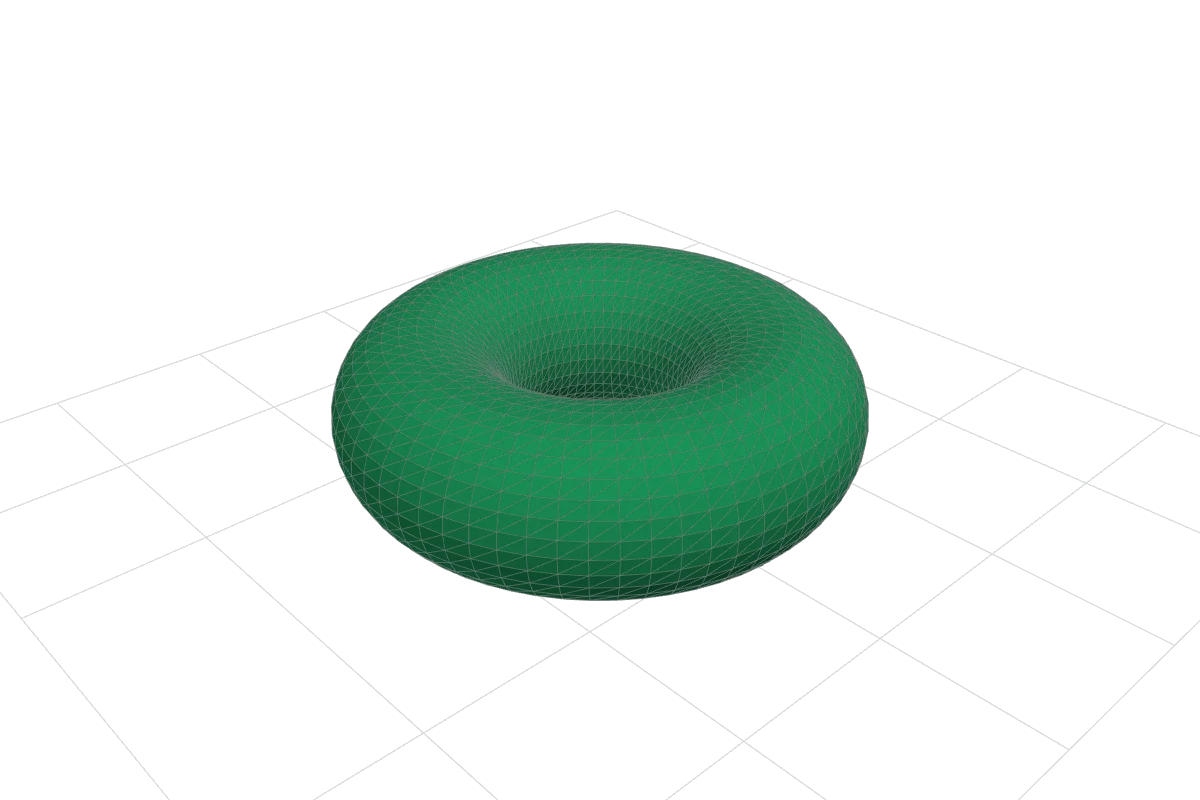
For a closed, hole-free surface there is a neat check called the Euler characteristic: vertices − edges + faces = 2 for a cube or a sphere (8 − 12 + 6 = 2) and 0 for a ring with one hole. The 3DA.XYZ Studio prints this number in its mesh report.
Meshes are not the only option:
| Representation | What it stores | Typical use |
|---|---|---|
| Polygon mesh | Vertices + flat faces | Games, film, 3D printing, the web |
| CAD solid (B-rep / NURBS) | Exact curved surfaces + feature history | Engineering and product design |
| Point cloud | Millions of measured points, no faces | 3D scanning, surveying |
| Voxels | A grid of tiny cubes, filled or empty | Medical CT/MRI scans, some games |
| Implicit / SDF | A formula that says inside or outside | Procedural modeling, some generative tools |
Whatever the source, almost everything is converted to triangles at the end, because that is what graphics hardware draws and what 3D printers slice.
How 3D graphics work
Your screen is flat, so every 3D image is a 2D picture computed from the 3D data. That computation is called rendering, and it happens in a few stages:
- Place the model in a scene by moving, rotating and scaling its vertices (a transform).
- Look through a camera. Every vertex is re-expressed relative to the camera position and direction.
- Project to 2D. Perspective projection shrinks distant points, like a photograph; orthographic projection keeps sizes equal, like a technical drawing.
- Fill the pixels. Each triangle is converted to the screen pixels it covers (rasterisation), keeping only the nearest surface at each pixel.
- Shade. Each pixel’s colour is computed from the surface direction, the lights and the material.
Real-time rendering — games, AR, web viewers like the Studio on this site — repeats this 30 to 120 times a second on a graphics processor (GPU). Offline rendering for film can spend minutes or hours per frame, tracing the paths of light rays to produce realistic reflections and soft shadows.

How 3D models are made
- Polygon modeling
- Moving, extruding and connecting vertices and faces directly. Flexible and fast for games and visual work. Compare methods.
- Digital sculpting
- Pushing and pulling a dense mesh like clay, for organic shapes such as faces and creatures.
- CAD (parametric) modeling
- Building a part from sketches, exact dimensions and constraints. Change one number and the model updates. CAD vs mesh modeling.
- 3D scanning and photogrammetry
- Measuring a real object with a scanner, or reconstructing it from dozens of overlapping photos. How capture works.
- Procedural and AI generation
- Models produced by rules or algorithms. Newer AI tools can generate meshes from text or images; the results usually need checking and cleanup before printing or production use.
3D printing: from model to object
3D printing (additive manufacturing) builds an object layer by layer. A program called a slicer cuts the model into horizontal layers, typically 0.1–0.3 mm thick on desktop machines, and writes the path the machine will follow. The three most common desktop and service processes are:
- FDM / FFF — melts plastic filament and draws each layer with a hot nozzle. Affordable and common at home.
- Resin (SLA, DLP, MSLA) — hardens liquid resin with light. Very fine detail; needs washing and curing.
- Powder bed (SLS, MJF) — fuses nylon powder with a laser or heat. Strong parts without support structures; mostly industrial.

A model that looks perfect on screen can still fail to print if its surface has holes or inside-out faces. Prepare a model for printing covers the checks, and the Studio highlights the problem edges.
3D movies, VR and AR: seeing depth
You see depth largely because your two eyes view the world from positions about 6 cm apart. Your brain fuses the two slightly different images — stereopsis. 3D displays recreate that difference:
- 3D cinema projects two images; polarised glasses let each eye see only one.
- VR headsets show a separate image to each eye and update it as your head moves.
- AR overlays 3D models on a live camera view or see-through display, anchored to real surfaces.
- Glasses-free (autostereoscopic) screens use lenses or barriers to send different images in different directions.

Where 3D is used
| Field | What 3D does there |
|---|---|
| Manufacturing & engineering | CAD design, simulation, prototypes, jigs and fixtures, spare parts |
| Medicine & dentistry | Surgical planning models from CT scans, custom implants and guides, clear aligners |
| Architecture & construction | Building models (BIM), visualisation, site scanning |
| Film, TV & games | Characters, environments, visual effects, real-time worlds |
| Retail & e-commerce | Interactive product viewers, AR “view in your room”, configurators |
| Heritage & museums | Scanning artefacts and sites for study, access and preservation |
| Education | Teaching geometry, anatomy, chemistry and engineering with models you can turn and print |
How to start with 3D
- Look at real models. Open one of our original samples in the Studio, switch on wireframe and count the triangles.
- Make something simple. Follow Make your first 3D model — a measured box you export to a real file.
- Learn the file formats. STL, OBJ, GLB and 3MF each keep different information.
- Choose a tool for your goal. Blender for art and animation, a CAD program for exact parts, a slicer for printing. All three have well-known free options.
Questions people ask
What does 3D mean in simple words?
Something that has length, width and depth — something you could walk around. On a computer, a 3D model is a shape described by points in space, so it can be viewed from any angle.
Is 3D the same as 3D printing?
No. 3D describes the geometry; 3D printing is one way to manufacture it. Most 3D models are never printed — they end up in games, films, product pages and engineering software.
What is the difference between a 3D model and a 3D render?
The model is the data (the shape). A render is a picture computed from it. One model can produce endless renders from different angles and in different lighting.
Why are 3D models made of triangles?
Three points always lie on one flat plane, so a triangle is never bent or ambiguous. Graphics hardware is built to draw triangles extremely fast, and any surface can be approximated by enough of them.
What is 4D?
Usually 3D plus time — an animation, or a printed object designed to change shape after printing. In mathematics it can also mean a fourth spatial dimension, which we can describe but not directly see.